
Bulldog Blocker AI Porn Filter
Ever AccountableLifestyle
4.31.38K Reviews
- Version
- 12.43.239-Aug-2026
- Installs
- 500.00K
- Age Rating
- Everyone
Screenshots



Our Review of Bulldog Blocker AI Porn Filter
 Analysis by Appyee
When I judge a content filter, I care less about bold promises than about whether it gives someone a practical way to shape their own browsing habits. Bulldog Blocker AI Porn Filter is aimed at people who want adult material blocked across their device, whether the reason is personal focus, a household rule, or a safer browsing setup for a child. Its purpose is clear, but I would treat it as one layer of protection rather than a substitute for supervision or careful device settings.
It is a free lifestyle app from Ever Accountable, with optional in-app purchases ranging from $2.99 to $149.99 per item. It is rated for Everyone, has an average rating of 4.4 from around 23,000 ratings, and has been installed over 500,000 times. Those figures suggest it has found a substantial audience, though they cannot tell you whether its filtering will match your particular habits, browsers, or family rules. I would make that decision based on a deliberate trial, not popularity alone.
What a blocker can—and cannot—do
The appeal here is the idea of setting a boundary that applies beyond a single website. That is different from relying on willpower in the moment or keeping a short list of URLs in a browser’s block settings. A device-level approach can be useful when you switch between apps or browsers, because the goal is to reduce the number of easy routes to material you are trying to avoid. The important practical question is whether it covers the places you actually use, so I would test your normal browsing routine after setup rather than assume every path is protected.
AI-based filtering can be valuable when unwanted material is not neatly confined to a known list of sites. At the same time, automatic classification is not a perfect substitute for judgement: a filter may block something you consider harmless or miss something you would rather avoid. That trade-off matters especially for shared devices, where different people have different expectations. I would discuss the boundaries with other users and check the results before relying on the app as a household rule-enforcer.
A useful way to fit it into daily life
Imagine someone who reaches for their phone during a break, then loses time to browsing they had meant to avoid. A blocker can add a pause between impulse and access, making it easier to return to the task at hand. It will not create motivation by itself, and it cannot decide what a healthy routine looks like, but it can make one specific distraction less convenient. For that use, I would pair the filter with a simple plan—such as leaving the phone outside the workspace during focused periods—rather than expecting software to solve the whole problem.
For a parent, the more useful workflow is to set expectations first, configure the device together where appropriate, and then check how the protection behaves during ordinary use. A filter is not a conversation about online safety, and it is not a reason to stop paying attention to a child’s digital life. It can still help reduce accidental exposure, but I would not present it as a guarantee that a child cannot encounter adult material.
Where it differs from simpler alternatives
Browser-level blocking is often enough if you only want to restrict browsing in one app and are comfortable maintaining the settings there. A broader blocker makes more sense when you want a boundary that is not tied to just one browser. Conversely, built-in family controls may be a better fit for parents who want a wider set of device-management tools rather than a focused adult-content filter. These approaches can also complement one another: use the control that best fits the household, then check for gaps instead of assuming one setting covers every situation.
Before depending on any filter, I recommend testing a few ordinary searches and sites that should be allowed as well as content you want restricted. This gives you a chance to notice false blocks or missed material while the stakes are low. It is also a sensible way to decide whether the app’s behaviour suits your needs without turning setup into a technical project. Keep the passcode private if you use one, but remember that a code only protects settings from casual changes; it does not make the filtering itself infallible.
There are also reasons to skip it. If you want a broad parental-control suite, detailed device supervision, or a guarantee that no adult content can ever appear, a focused blocker may not be enough on its own. If you are uncomfortable with an app operating as part of your browsing protection, consider whether the setup and permissions presented on your device feel acceptable before continuing. I would rather see someone choose a narrower tool they understand than install a blocker and assume it handles every online risk.
Android users should note that the current version is 12.27.213-Jan-2026 and requires Android 11 or later. The app is also available on iOS, though the experience and available controls can differ between operating systems. Since the free download includes optional purchases, check the purchase choices in the app before committing to anything; the listed range is broad enough that it is worth confirming what any paid option actually includes for your needs.
Ever found yourself in the endless spiral of internet distractions, where your focus wavers and productivity takes a backseat? If you're nodding along, then Bulldog Blocker AI Porn Filter might just be the app you've been looking for. This nifty app promises to shield users from unwanted adult content, creating a safer and more focused online environment.
Getting Started with Bulldog Blocker
Jumping into the world of Bulldog Blocker AI Porn Filter is straightforward. The app is available for both Android and iOS, so no one misses out. Once you’ve downloaded it, setting it up is a breeze. The interface is clean and intuitive, which means you don’t need to be a tech wizard to navigate through its features.
After installation, the app prompts you to set up a passcode. This is a crucial feature, especially if you share your device with others. It ensures that the settings remain tamper-proof and tailored to your preferences. The onboarding process gently guides you through its features, making sure you’re well-acquainted with what it can do.
Features That Stand Out
One of the first things I noticed about Bulldog Blocker is its use of AI technology. The app continuously learns from browsing patterns, improving its filtering accuracy over time. This adaptability means it doesn’t just rely on a static database of blocked sites, but actively evolves its understanding of what constitutes unwanted content.
Parents will especially appreciate the app’s ability to provide a safe browsing environment for kids. With the internet being a vast and sometimes wild place, having a tool that automatically filters out adult content gives peace of mind. It’s like having a digital watchdog, alert and vigilant.
Another feature that deserves a shoutout is its compatibility with various browsers. Whether you’re an avid Chrome user or swear by Safari, Bulldog Blocker seamlessly integrates, ensuring no gaps in protection.
The User Experience
Now, let's talk about usability. The app runs quietly in the background, so you won’t even notice it’s there. But rest assured, it’s always working, ready to block any inappropriate content that tries to sneak through. The notifications are minimal, avoiding any unnecessary distractions while you’re working or browsing.
In terms of performance, the app is lightweight and doesn’t hog your device’s resources. This is a major plus, especially if you're running multiple apps simultaneously. No lag, no fuss, just smooth sailing.
Final Thoughts
In a world where digital distractions are just a click away, Bulldog Blocker offers a solid solution for maintaining focus and safety online. Its smart use of AI, user-friendly setup, and seamless integration make it a top contender for anyone looking to enhance their browsing experience.
Whether you’re a parent wanting to ensure a child-safe internet or someone who simply wants a cleaner browsing space, Bulldog Blocker has got you covered. With its continuous updates and improvements, it’s an app that grows with you, adapting to your needs. So, if you’re ready to take control of your online environment, why not give Bulldog Blocker a try?
My recommendation is to approach it as a practical aid, not an all-purpose promise. It is most compelling for someone who wants a dedicated adult-content filter and is willing to check that it works as expected on their own devices. If you need wider controls or prefer to manage restrictions through built-in settings, another option may suit you better. For anyone who wants this particular boundary, a careful setup and realistic expectations make Bulldog Blocker worth considering.
Verdict
Strengths of Bulldog Blocker AI Porn Filter
- Easy setup and user-friendly interface.
- Real-time filtering with minimal lag.
- Customizable settings for different users.
- Compatible with multiple devices.
- Low resource usage on smartphones.
Limitations of Bulldog Blocker AI Porn Filter
- Subscription required for premium features.
- Limited language support.
- Occasional false positives.
- Some sites may bypass the filter.
- Requires internet connection for updates.
Other Releases by Ever Accountable
View All
Ever Accountable – Quit Porn
Productivity4.5
Similar Picks in This Category
View All
SmartThings
Samsung Electronics Co., Ltd.4.6

Google Home
Google LLC4.0

Pinterest4.2

Astrotalk - Talk to Astrologer
Astrology & Horoscope4.7

My Verizon
Verizon Consumer Group4.5

Samsung Wallet (Samsung Pay)
Samsung Electronics Co., Ltd.4.1
Frequently Asked Questions
What platforms is Bulldog Blocker AI Porn Filter available on?
Bulldog Blocker AI Porn Filter is available on both Android and iOS platforms. This ensures that users across different devices can benefit from its content filtering capabilities. It's designed to work seamlessly on smartphones and tablets, providing a robust solution for parents and users who wish to maintain a safe browsing environment.
How does Bulldog Blocker AI Porn Filter work?
The app utilizes advanced AI technology to analyze and filter out inappropriate content, such as pornographic material. It operates in real-time, scanning websites and blocking harmful content before it reaches the user. This ensures a safer browsing experience, particularly for children and teenagers using the internet.
Is Bulldog Blocker AI Porn Filter easy to set up?
Yes, Bulldog Blocker AI Porn Filter is user-friendly and easy to set up. The app provides a simple installation process with step-by-step instructions, making it accessible even for users who are not tech-savvy. Once installed, it runs in the background with minimal manual intervention required.
Can Bulldog Blocker AI Porn Filter be customized?
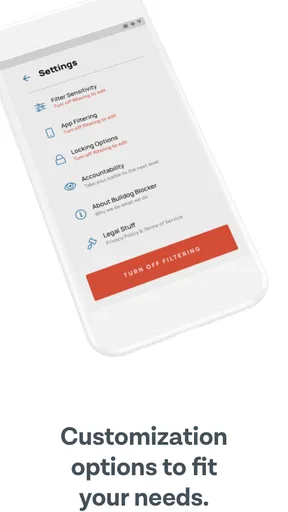
Absolutely, the app offers a range of customization options to fit different user needs. Users can adjust sensitivity settings, whitelist certain websites, and even set up specific filtering profiles. This flexibility allows users to tailor the app's filtering capabilities to suit their personal preferences and requirements.
Does Bulldog Blocker AI Porn Filter affect device performance?
The app is designed to run efficiently without significantly impacting device performance. It operates in the background, using minimal resources to ensure that your device remains responsive and fast. Users generally report no noticeable lag or slowdown, making it ideal for continuous use.
